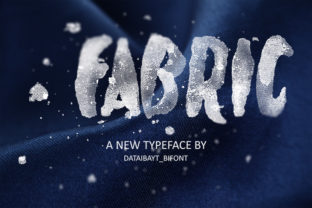
Fabric Display Font for Handmade Labels & Printables
If you’ve ever spent hours tweaking a candle label only to realize the font looks flat or forgettable on the shelf—or if your wedding invitation suite feels charming but lacks that confident, cohesive punch—you know how much weight a single typeface carries in handmade product design. Fabric is one of those rare display fonts that doesn’t just sit nicely on screen—it lifts your work. It’s all-caps, bold in presence but not heavy in execution, with clean lines, subtle contrast, and just enough character to feel intentional without sacrificing readability.
I first used Fabric on a set of linen-wrapped gift tags for a local boutique. The uppercase structure gave each tag immediate clarity—even at 12pt on a 1.5" x 2.5" tag—and the even spacing meant no awkward crowding when cutting vinyl or running through my Cricut Maker. That’s the quiet superpower of Fabric: it’s designed for display, yes—but built for real-world making.
Where Fabric Shines in Physical & Digital Craft Projects
Fabric works best where impact matters more than paragraph length. Think short phrases, names, titles, brand names, and decorative headings—not body copy. Its strength lies in how it anchors attention while supporting your product’s story, not competing with it.
- Product labels & packaging: Candle jars, soap wraps, honey bottles—Fabric gives artisan goods a polished, boutique-ready look. On matte kraft paper, it reads crisp and warm; on glossy sticker stock, it pops with confidence.
- Stickers & iron-on transfers: Because Fabric has consistent stroke width and open counters, it cuts cleanly on Silhouette Cameo and Cricut machines—even at 0.25" height. No broken letters, no lost details.
- Invitations & wedding stationery: Use Fabric for “Mr. & Mrs.” banners, welcome signs, or place cards. Paired with a delicate script (like a flowing brush script) or a soft serif (think Garamond or Playfair), it creates elegant hierarchy without looking stiff.
- Printable wall art & planner pages: Fabric adds visual rhythm to minimalist quote prints (“Gather,” “Bloom,” “Made With Love”) and gives themed planner covers a grounded, modern anchor.
- Seasonal crafts & holiday packaging: I used Fabric for a line of Christmas cookie box labels last year—“Peppermint,” “Ginger Spice,” “Cranberry Bliss”—and customers specifically mentioned how “clear and joyful” the text felt on social previews and in person.
Readability Tips You’ll Actually Use
Fabric isn’t meant for paragraphs—but it *is* meant to be read quickly and remembered. Here’s what I’ve learned from testing it across materials:
- For small stickers (under 1"), stick to 3–4 words max. Avoid tight kerning adjustments unless you’re exporting as vector—Fabric’s default spacing is optimized for legibility.
- On dark backgrounds (like navy cardstock or black mugs), use white or light cream Fabric text. Its clean edges prevent halation or blurring.
- When layering Fabric over textured paper or fabric mockups, increase letter spacing by 20–30 units in your design software. This keeps the caps from visually bleeding together.
- In SVG files for cutting machines, convert Fabric to outlines before saving—especially if sharing templates with others who may not own the font.
Smart Pairings That Feel Intentional
Fabric thrives alongside contrast. Its strong, upright stance makes it a natural partner for softer, more organic styles—never competition.
Try pairing Fabric with:
- A relaxed handwritten font for greeting cards or boutique tags—Fabric for the shop name, script for the tagline.
- A neutral sans serif (like Montserrat or Inter) for price tags, ingredient lists, or care instructions—Fabric for the product title, sans for supporting text.
- A classic serif (like Lora or Cormorant Garamond) for wedding programs or fine stationery—Fabric for headings, serif for body text.
Avoid pairing Fabric with other bold display fonts or overly decorative scripts—the result can feel cluttered rather than curated.
Licensing & Real-World Usage Notes
Fabric is a commercial font, and that matters deeply when you’re selling physical products, digital downloads, or editable templates. Under its standard license, you’re fully covered to use Fabric in:
- Handmade product labels (candles, bath bombs, food items)
- SVG cut files sold on Etsy or Creative Market
- Printable PDFs (planners, invitations, wall art)
- Branded merchandise (tote bags, mugs, T-shirts)
- Client work (e.g., designing a logo or packaging for a small business)
Just remember: you may not resell or redistribute the font file itself. And if you’re bundling Fabric into an editable Canva template or layered PSD, make sure your license permits embedding—most premium display fonts do, but always double-check the EULA.
Why Fabric Fits Into Your Creative Workflow—Not Just Your Design Files
As someone who ships 200+ custom orders a month—from foil-stamped greeting cards to laser-cut wooden signs—I rely on fonts that behave predictably across formats. Fabric does. It exports cleanly to PNG, SVG, and PDF. It renders consistently in Canva, Affinity Designer, and Adobe Illustrator. And because it’s all-caps, there’s no second-guessing case sensitivity when naming layers or prepping files for production.
It’s also versatile enough to evolve with your brand. Start with Fabric on a simple kraft tag. Grow into using it across your website headers, Instagram highlights, and wholesale line sheets. That consistency—clean, confident, quietly distinctive—is what helps customers recognize your work before they even see your logo.
Fabric won’t solve every typography challenge—but for the moments when your product needs to say something clear, memorable, and beautifully made? It’s the kind of display font that earns its place in your core design toolkit.